
Food Image Recognition with Confirmation
What You’ll Build
You’ll implement a photo-to-dishes flow where your app uploads a meal image, receives top-N dish candidates per region from LogMeal, displays them to the user, and asks for a quick confirmation before persisting the meal. This balances AI automation with a human-in-the-loop step that improves accuracy and user trust.
This pattern is ideal for diet logs and wellness apps: the model proposes dishes; the user confirms (or corrects) them; the app stores the final, validated result for downstream analytics and nutrition.
Personalization tip: Before first use, consider setting the user’s country and language to improve recognition labels and ranking. See POST /profile/modifyUserProfileInfo for details.
Prerequisites
- Plan: Analyse and above (see more info about LogMeal Plans)
- User type: 🔴 APIUser (see more info about User Types)
- Client library for HTTP (e.g., Python
requests, Nodeaxios, JavaOkHttp) - 1–2 sample food images for testing
Understanding Segmentation
Segmentation is the process of dividing a meal image into distinct regions, each representing a detected dish or food item.
This step allows the Food AI Engine API to identify multiple dishes within the same photo and generate separate top-N dish predictions for each region.
For example, a single photo containing pasta, salad, and bread will be segmented into three regions — one per food type — so each can be recognized and confirmed individually.
The segmentation step is performed automatically when calling POST /image/segmentation/complete.
In this documentation, we may use the terms “segmentation” and “detection” interchangeably, as both refer to identifying and isolating food regions within an image.
Sequence Diagrams
Main Flow (Food Segmentation + Candidate Dishes Confirmation)
sequenceDiagram
  participant User
  participant App
  participant Food AI Engine API

  User->>App: Capture/choose meal photo
  App->>Food AI Engine API: POST /v2/image/segmentation/complete <br> (Authorization: APIUser token, image)
  Food AI Engine API-->>App: 200 OK (imageId, segmentation results)
  App-->>User: Show top 5 candidate dishes per detected item
  User->>App: Confirm/adjust dish per item
  App->>Food AI Engine API: POST /v2/image/confirm/dish (imageId, confirmed items)
  Food AI Engine API-->>App: 200 OK (confirmed items)
  App-->>User: Saved ✅
Fallback Flow (If Something Wasn’t Detected)
sequenceDiagram
  participant User
  participant App
  participant Food AI Engine API

  App->>User: "Missing something? Search to add it."
  App->>Food AI Engine API: GET /v2/dataset/dishes (query)
  Food AI Engine API-->>App: 200 OK (complete list of existing dishes in the DB)
  User->>App: Search a dish in the list and select it
  App->>Food AI Engine API: POST /v2/image/confirm/dish (imageId, added dish)
  Food AI Engine API-->>App: 200 OK (updated items)
Implementation Guide
Implementation Examples (Recipes)
Follow these recipes to implement the previously mentioned flow:
- Set profile data once to improve label language and regional dishes:
- Send the image for segmentation to obtain regions and top dish candidates per region. Display the top 5 candidate dishes per region.
- Ask the user to confirm or correct the dishes appearing on the image:
- If a user reports a missing item or a wrong recognition, search the dataset and confirm the chosen dish into the target region:
Downloadable Code Examples
These recipes show the core steps in a few languages. For more language options (and complete runnable projects), see Ready-to-Use Code.
User Interaction Recommendations
Recommendations:
- Show top-N candidates for each item/food region.
- Let users confirm or adjust before saving.
- Fallback search if item not detected.
- Use thumbnails for bounding boxes or segmented regions to help users identify dishes.
- Use
processed_image_sizeto map bounding boxes to your displayed image size.
Here is an example on how we recommend displaying the suggested food items to the user for confirmation:
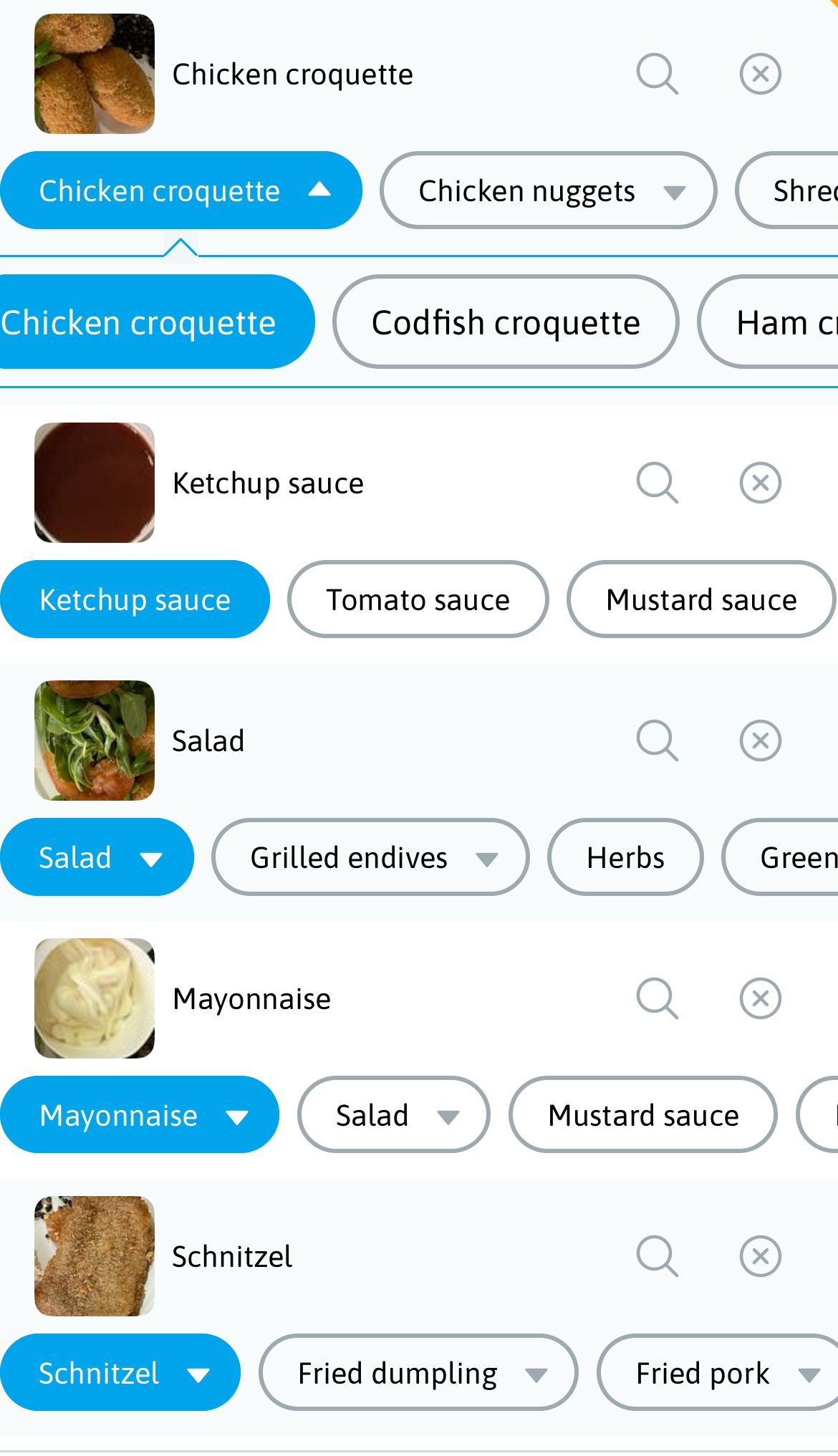
Example on how to display and allow choosing the alternative food detections to the user.
Related Endpoints
Use the following endpoints to recognize, confirm, and retrieve the final dishes for an image:
- POST /image/segmentation/complete → 🔴 Detect and segment all food items in an image and return the top dish predictions for each region.
- POST /image/confirm/dish → 🔴 Confirm or correct the selected dish for each detected region.
- GET /dataset/dishes → ⚫ 🔴 🔵 Retrieve the complete dish catalog for client-side fallback search when a dish is missing or incorrectly recognized.
Optional personalization and retrieval helpers:
- POST /profile/modifyUserProfileInfo → 🔴 Set the user's language and country to localize labels and improve regional dish recognition.
- GET /intake/{imageId} → ⚫ 🔴 🔵 Retrieve the complete confirmed intake for the supplied
imageId.
Remember to check applicable request limitations inside each endpoint.
Common Pitfalls & Tips
- Show candidates to users: human confirmation materially improves accuracy and downstream trust.
- Scaling segments: use
processed_image_sizeto map bounding boxes to your displayed image size. - Internationalization: set
languagefor labels; setcountryfor regional dishes. - Error handling: manage
413(payload too large) and429(rate limits). See Plans & Limits.
Optional Enhancements
- After confirmation, call ingredient endpoints to extract list of ingredients and quantities and/or nutritional endpoints to extract macros/micros.
- Persist user corrections.
- Track latency and add a background upload with a progress bar.
Next Steps
Pick your path based on what you want to build next:
Retrieve standardized recipe ingredients and quantities for confirmed dishes from a food intake.
Extract per‑dish macro & micro nutrients from a confirmed intake using standardized ingredients.
Show day/period summaries using confirmed ingredients and intakes.
Capture a depth‑based image sequence around food items to estimate their quantities using the Quantity Detection API.
Updated 16 days ago